
LINE Messaging APIを利用して特定ユーザーに独自メッセージを送信する方法を解説します。
■実現する機能
サイト上に配置した『LINE連携』を押下すると、独自メッセージを対象ユーザーに対して送信する。
■処理イメージ
1. ユーザーが画面に表示された『LINE連携』ボタン押下
2. (LINEに未ログインの場合)LINEログイン画面に遷移
3. ユーザーはアカウント情報を入力しLINEにログインする
4. サーバーはLINEログインのコールバックを受け取り、LINEのユーザーIDを取得する
5. サーバーはユーザーが友達追加されているかを確認する
6. サーバーは取得したLINEのユーザーIDに対して独自メッセージをプッシュメッセージで送信する
事前準備
LINE公式アカウントとMessaging APIの有効化
Messaging APIを利用するには、LINE公式アカウントとMessaging APIの有効化が必要です。
1.LINE公式アカウントを作成する。
詳しくは、『Messaging APIドキュメント』の「1. LINE公式アカウントを作成する」を参照。
2.作成したLINE公式アカウントでMessaging APIの利用を有効にする。
詳しくは、『Messaging APIドキュメント』の「2. LINE公式アカウントでMessaging APIを有効にする」を参照。
「チャネルID」「チャネルシークレット」「チャネルアクセストークン(長期)」の取得
MessageAPIなどを利用するために必要な「チャネルID」「チャネルシークレット」「チャネルアクセストークン(長期)」を確認しメモしておきます。「LINE Developers」にログインし、「チャネルの設定」、「Messaging API設定」で確認できます。
| 項目 | 概要 | 用途 |
|---|---|---|
| チャネルID | LINEアプリ(チャネル)を一意に識別するためのID | ・LINEログイン ・アクセストークンの発行/交換 |
| チャネルシークレット | LINEアプリ(チャネル)を一意に識別するための秘密鍵 | ・アクセストークンの発行/交換 ・IDトークンの検証 |
| チャネルアクセストークン(長期) | 「LINE Messaging API」を使い、ユーザーにメッセージをPUSH・返信するための認証トークン | Messaging APIの各操作 |
友だち追加オプションの有効化
LINEログインの認証時に以下のような友達追加オプションを表示させるために友達追加オプションの有効化を行います。
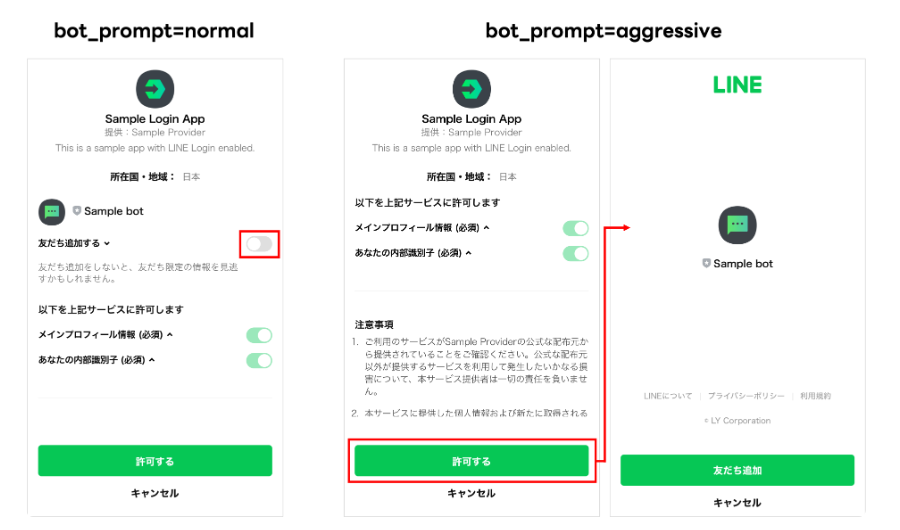
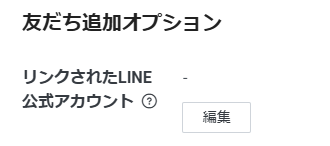
有効化するにはログインチャネルの友達追加オプションで公式アカウントをリンクします。(これとは別に認証認可要求時にオプション指定が必要です)
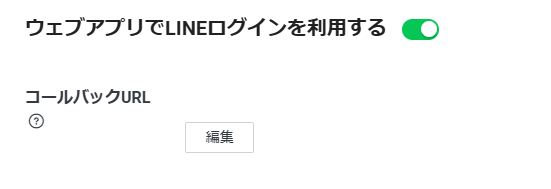
コールバックURLの設定
LINEログイン完了時に呼び出されるシステム側のコールバックURLはチャネルで事前に設定しておく必要があります。「LINE Developers」のログインチャネルの「LINEログイン設定」で設定します。
Messaging APIの仕様、注意点
・Massaging API 仕様
https://developers.line.biz/ja/docs/messaging-api
・二重送信にならないようリトライキー(X-Line-Retry-Key)を用いて送信する。リトライキーはLINEからは提供されないのでシステム側で独自に付与する。

・リクエスト内容によってレート制限がある。マルチキャスト系は特に注意。
実現方法
システム構成
以下の構成を前提で考えます。
| サーバ名称 | 用途 | 補足 |
| WEB | WEBコンテンツを配置 | 「LINE連携」ボタンを配置したコンテンツ |
| バックエンド | LINEとのやりとりを行う | Messaging API呼び出しとコールバック受付 |
| セッションDB | LINE認証で取得した情報を格納 |
処理の流れ
LINEとやりとりするエンドポイントは以下のように定義した前提で処理の流れを説明します。このURLはシステム独自に定義してください。
1.yourdomain/line/auth/start   → LINE連携ボタン押下時の認証開始
2.yourdomain/line/auth/callback → LINEログイン後にLINEから呼び出されるコールバック| No | 主体 | 処理 | 補足 |
| 1 | ユーザ | LINE連携ボタン押下 | /line/auth/start |
| 2 | バックエンド | 認証用URLを生成し、LINEにリダイレクト | https://access.line.me/oauth2/v2.1/authorize ※詳細は「認証用URL生成」参照 |
| 3 | LINE | 認証画面を表示 | |
| 4 | ユーザ | LINEログイン | LINEのアカウント情報入力。認証後システムが設定したコールバックURLが呼び出される。 |
| 5 | バックエンド | コールバック処理 | ・codeとstateパラメータ受信・ アクセストークン取得・ セッション保存・メッセージ送信 https://api.line.me/v2/bot/message/push ・リダイレクト(任意のURL) |
認証用URL生成
LINEの認証用URL「https://access.line.me/oauth2/v2.1/authorize」にパラメータを付与して呼び出します。必須パラメータは以下になります。
redirect_uriはhttpsが必須で、オレオレ証明書は利用不可です。
| パラメータ | 説明 | 値 |
|---|---|---|
response_type | 認証フロータイプ | code(固定) |
client_id | LINEログインチャネルID | チャネルID |
redirect_uri | 認証後のリダイレクト先URL | システムのコールバックURL(システムでユニーク) |
state | CSRF対策トークン | セッション単位でランダムな英数字文字列 |
scope | 取得する権限 | ユーザーに付与を依頼する権限。メッセージ送信には「openid」が必要。友達追加判定判定には「profile」が必要。 |
| bot_prompt | LINE公式アカウントを友だち追加するオプションをユーザーのログイン時に表示します。 | normalまたはaggressiveを指定します。詳しくは、「LINEログインしたときにLINE公式アカウントを友だち追加する(友だち追加オプション)」を参照してください。 |
その他オプションパラメータについては「https://developers.line.biz/ja/docs/line-login/integrate-line-login/#making-an-authorization-request」参照。
友達登録、ブロック状況の確認
友達登録されていない場合、ブロックされていない場合はメッセージ送信が行えないのでメッセージ送信前に状態を確認します。状態はFrendshipAPI「https://api.line.me/friendship/v1/status」で確認できます。
| リクエストヘッダ | 説明 | 値 |
|---|---|---|
Authorization | Bearer {access token} | 情報を取得したいユーザーに紐づくアクセストークン |
プッシュメッセージ送信
ユーザーにメッセージを送信するには「https://api.line.me/v2/bot/message/push」を利用します。
| リクエストヘッダー | 説明 | 値 |
|---|---|---|
Content-Type | コンテンツタイプ | application/json |
Authorization | Bearer {channel access token} | チャネルアクセストークン |
X-Line-Retry-Key | リトライキー | リトライキー。任意の方法で生成した16進表記のUUID(例:123e4567-e89b-12d3-a456-426614174000)を指定します。詳しくは、『Messaging APIドキュメント』の「失敗したAPIリクエストを再試行する」を参照してください。 |
| リクエストボディ | 説明 | 値 |
|---|---|---|
to | 送信先のID | 今回は送信先のユーザーIDを指定。 |
messages | 送信するメッセージ | 送信するメッセージの配列 最大件数:5 テキストメッセージの場合は以下参照。https://developers.line.biz/ja/reference/messaging-api/#text-message |
処理シーケンス詳細
シーケンス図はMermaid Live Editorで作成。Mermaid Live Editorのテキストも記載しておきます。
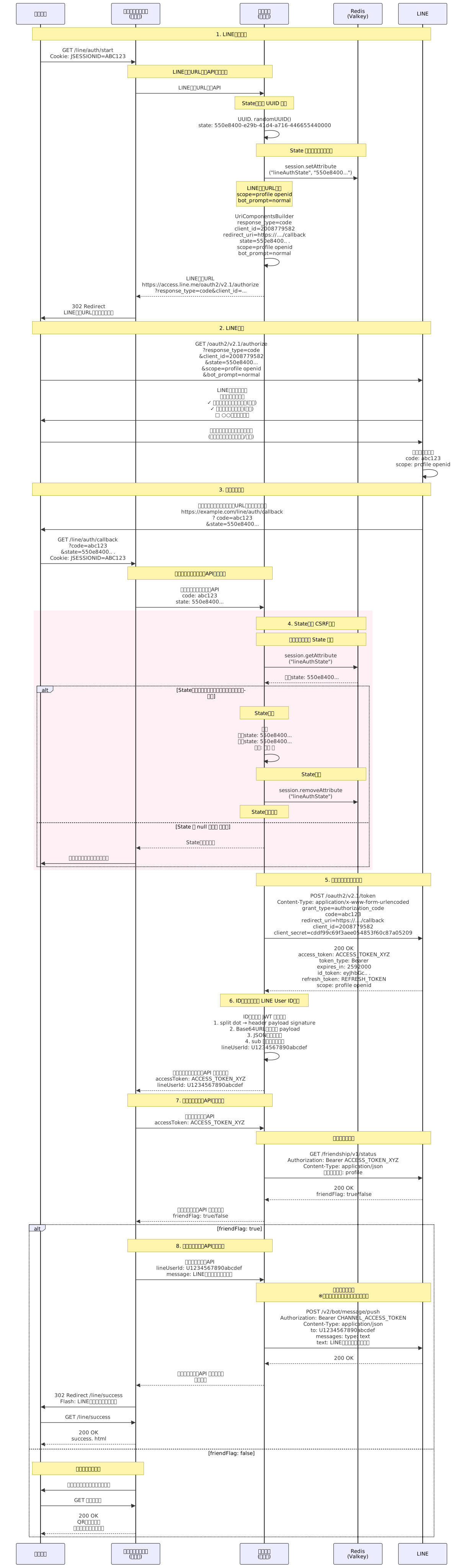
sequenceDiagram
    participant Browser as ブラウザ
    participant App as アプリケーション<br/>(複数台)
    participant Common as 共通部品<br/>(複数台)
    participant Redis as Redis<br/>(Valkey)
    participant LINE as LINE

    Note over Browser,LINE:  1. LINE連携開始
    Browser->>App:   GET /line/auth/start<br/>Cookie:  JSESSIONID=ABC123

    Note over App,Common: LINE認証URL生成API呼び出し
    App->>Common: LINE認証URL生成API

    Note over Common:  State検証用 UUID 生成
    Common->>Common: UUID. randomUUID()<br/>state: 550e8400-e29b-41d4-a716-446655440000

    Note over Common,Redis: State をセッションに保存
    Common->>Redis:  session.setAttribute<br/>("lineAuthState", "550e8400...")

    Note over Common: LINE認証URL生成<br/>scope=profile openid<br/>bot_prompt=normal
    Common->>Common:  UriComponentsBuilder<br/>response_type=code<br/>client_id=2008779582<br/>redirect_uri=https://..../callback<br/>state=550e8400.. .<br/>scope=profile openid<br/>bot_prompt=normal

    Common-->>App: LINE認証URL<br/>https://access.line.me/oauth2/v2.1/authorize<br/>?response_type=code&client_id=...

    App->>Browser: 302 Redirect<br/>LINE認証URLにリダイレクト

    Note over Browser,LINE: 2. LINE認証
    Browser->>LINE: GET /oauth2/v2.1/authorize<br/>?response_type=code<br/>&client_id=2008779582<br/>&state=550e8400...<br/>&scope=profile openid<br/>&bot_prompt=normal

    LINE->>Browser: LINE認証画面表示<br/>【許可する権限】<br/>✓ メインプロフィール情報(必須)<br/>✓ あなたの内部識別子(必須)<br/>□ ○○を友だち追加

    Browser->>LINE:  ユーザーが許可するをクリック<br/>(友だち追加チェックあり/なし)

    LINE->>LINE:  認可コード生成<br/>code: abc123<br/>scope: profile openid

    Note over Browser,LINE: 3. コールバック
    LINE->>Browser: システム側のコールバックURLにリダイレクト<br/>https://example.com/line/auth/callback<br/>? code=abc123<br/>&state=550e8400...

    Browser->>App:  GET /line/auth/callback<br/>?code=abc123<br/>&state=550e8400.. .<br/>Cookie: JSESSIONID=ABC123

    Note over App,Common: アクセストークン取得API呼び出し
    App->>Common: アクセストークン取得API<br/>code: abc123<br/>state:  550e8400...

    rect rgb(255, 240, 245)
        Note over Common,Redis: 4. State検証 CSRF対策

        Note over Common,Redis: セッションから State 取得
        Common->>Redis: session.getAttribute<br/>("lineAuthState")
        Redis-->>Common: 保存state: 550e8400...

        alt State検証:パラメータとセッション情報を比較
            Note over Common:  State照合
            Common->>Common: 照合<br/>受信state: 550e8400...<br/>保存state: 550e8400... <br/>結果: 一致 ✅

            Note over Common,Redis: State削除
            Common->>Redis:  session.removeAttribute<br/>("lineAuthState")

            Note over Common: State検証成功

        else State が null または 不一致
            Common-->>App: State検証エラー
            App->>Browser: エラー画面等にリダイレクト
        end
    end

    Note over Common,LINE: 5. アクセストークン取得
    Common->>LINE: POST /oauth2/v2.1/token<br/>Content-Type: application/x-www-form-urlencoded<br/>grant_type=authorization_code<br/>code=abc123<br/>redirect_uri=https://..../callback<br/>client_id=2008779582<br/>client_secret=cddf99c69f3aee054853f60c87a05209

    LINE-->>Common: 200 OK<br/>access_token:  ACCESS_TOKEN_XYZ<br/>token_type: Bearer<br/>expires_in: 2592000<br/>id_token: eyJhbGc.. .<br/>refresh_token: REFRESH_TOKEN<br/>scope:  profile openid

    Note over Common: 6. IDトークンから LINE User ID抽出
    Common->>Common: IDトークン JWT デコード<br/>1. split dot → header payload signature<br/>2. Base64URLデコード payload<br/>3. JSON簡易パース<br/>4. sub フィールド抽出<br/>lineUserId: U1234567890abcdef

    Common-->>App: アクセストークン取得API レスポンス<br/>accessToken: ACCESS_TOKEN_XYZ<br/>lineUserId: U1234567890abcdef

    Note over App,Common: 7. 友だち状態確認API呼び出し
    App->>Common: 友だち状態確認API<br/>accessToken: ACCESS_TOKEN_XYZ

    Note over Common,LINE: 友だち状態確認
    Common->>LINE: GET /friendship/v1/status<br/>Authorization: Bearer ACCESS_TOKEN_XYZ<br/>Content-Type: application/json<br/>必要スコープ: profile

    LINE-->>Common: 200 OK<br/>friendFlag: true/false

    Common-->>App: 友だち状態確認API レスポンス<br/>friendFlag: true/false

    alt friendFlag: true
        Note over App,Common: 8. メッセージ送信API呼び出し
        App->>Common: メッセージ送信API<br/>lineUserId: U1234567890abcdef<br/>message: LINE連携が完了しました

        Note over Common,LINE: メッセージ送信<br/>※チャネルアクセストークンを使用
        Common->>LINE: POST /v2/bot/message/push<br/>Authorization: Bearer CHANNEL_ACCESS_TOKEN<br/>Content-Type: application/json<br/>to: U1234567890abcdef<br/>messages: type: text<br/>text: LINE連携が完了しました

        LINE-->>Common: 200 OK

        Common-->>App:  メッセージ送信API レスポンス<br/>送信完了

        App->>Browser: 302 Redirect /line/success<br/>Flash: LINE連携が完了しました

        Browser->>App: GET /line/success
        App-->>Browser: 200 OK<br/>success. html

    else friendFlag: false
        Note over App,Browser: 友だち追加を促す
        App->>Browser: 任意の画面などにリダイレクト

        Browser->>App: GET 任意の画面
        App-->>Browser: 200 OK<br/>QRコード表示<br/>友だち追加ボタンなど
    end
サンプル実装
環境準備
Javaインストール
SpringBootを動かすためにAmazon LinuxにJavaをインストールします。
sudo dnf install -y java-21-amazon-corretto-develAPI Gateway作成
LINEからのコールバックを受け取るためにはhttpsのエンドポイントが必要です。今回は簡易的に作成するため、API Gatewayでエンドポイントを作成し、API Gateway経由でSpringBootアプリへリクエストを送信するように構成します。
| APIタイプ | HTTP API |
| API名 | LineCallBackAPI |
| IP アドレスのタイプ | IPv4 |
| 統合 | HTTP |
| 統合(メソッド) | ANY |
| 統合(エンドポイント) | http://<EC2のDNSまたはIP>:8080/{proxy} |
| ルート | ANY /{proxy+} ※全経路をEC2へ転送 |
application.yml
server:
  port: 8080
  # API GatewayやCloudFrontなどのリバースプロキシ越しで元のスキーム/ホストを正しく解釈
  forward-headers-strategy: framework

# LINE設定
line:
  # LINEログインチャネル(OAuth認証用)
  login:
    channel-id: チャネルID
    channel-secret: チャネルシークレット
    callback-url: https://APIGatewayのURL/line/auth/callback

  # Messaging APIチャネル(メッセージ送信用)
  messaging:
    channel-id:  チャネルID
    channel-secret: チャネルシークレット
    channel-access-token: チャネルアクセストークン(長期)

  # LINE公式API URL
  api:
    authorize-url: https://access.line.me/oauth2/v2.1/authorize
    token-url: https://api.line.me/oauth2/v2.1/token
    friendship-url: https://api.line.me/friendship/v1/status
    push-message-url: https://api.line.me/v2/bot/message/push
  # ログ設定
logging:
  level:
    root: INFO
    com.example.demo: DEBUG
config系
LineProperties
package com.example.demo.config;

import jakarta.annotation.PostConstruct;

import org.springframework. boot.context.properties.ConfigurationProperties;
import org.springframework.stereotype.Component;

import lombok.Data;
import lombok.extern.slf4j.Slf4j;

@Slf4j
@Data
@Component
@ConfigurationProperties(prefix = "line")
public class LineProperties {

    private Login login = new Login();
    private Messaging messaging = new Messaging();
    private Api api = new Api();

    @PostConstruct
    public void init() {
        log.debug("=== LINE設定情報ロード開始 ===");
        log.debug("[LINEログイン] Channel ID: {}", maskChannelId(login.getChannelId()));
        log.debug("[LINEログイン] Channel Secret: {}", maskSecret(login.getChannelSecret()));
        log.debug("[LINEログイン] Callback URL: {}", login.getCallbackUrl());
        log.debug("[Messaging API] Channel ID: {}", maskChannelId(messaging.getChannelId()));
        log.debug("[Messaging API] Channel Secret: {}", maskSecret(messaging. getChannelSecret()));
        log.debug("[Messaging API] Access Token: {}", maskToken(messaging.getChannelAccessToken()));
        log.debug("=== LINE設定情報ロード完了 ===");
    }

    private String maskChannelId(String value) {
        if (value == null || value.length() < 4) return "****";
        return value.substring(0, 4) + "****";
    }

    private String maskSecret(String value) {
        if (value == null || value.length() < 8) return "****";
        return value.substring(0, 4) + "****" + value.substring(value.length() - 4);
    }

    private String maskToken(String value) {
        if (value == null || value.length() < 20) return "****";
        return value.substring(0, 10) + "****";
    }

    @Data
    public static class Login {
        private String channelId;
        private String channelSecret;
        private String callbackUrl;
    }

    @Data
    public static class Messaging {
        private String channelId;
        private String channelSecret;
        private String channelAccessToken;
    }

    @Data
    public static class Api {
        private String authorizeUrl;
        private String tokenUrl;
        private String friendshipUrl;
        private String pushMessageUrl;
    }
}RestTemplateConfig
package com.example.demo.config;

import org.springframework. context.annotation.Bean;
import org.springframework.context.annotation.Configuration;
import org.springframework.http.client.SimpleClientHttpRequestFactory;
import org.springframework.web.client.RestTemplate;

import lombok.extern.slf4j.Slf4j;

@Slf4j
@Configuration
public class RestTemplateConfig {

    @Bean
    public RestTemplate restTemplate() {
        log.debug("RestTemplate初期化開始");

        SimpleClientHttpRequestFactory factory = new SimpleClientHttpRequestFactory();
        factory.setConnectTimeout(10000); // 10秒
        factory.setReadTimeout(10000);    // 10秒

        RestTemplate restTemplate = new RestTemplate(factory);

        log.debug("RestTemplate初期化完了");
        return restTemplate;
    }
}Controller
LineAuthController
package com.example. demo.controller;

import jakarta.servlet.http.HttpSession;

import org.springframework.stereotype. Controller;
import org.springframework. web.bind.annotation.GetMapping;
import org.springframework.web.bind.annotation.RequestMapping;
import org.springframework.web. bind.annotation.RequestParam;
import org.springframework.web.servlet.mvc.support.RedirectAttributes;

import com.example.demo.dto.LineTokenResponse;
import com.example.demo.service.LineAuthService;
import com.example.demo.service.LineFriendshipService;
import com.example.demo.service. LineMessageService;

import lombok. RequiredArgsConstructor;
import lombok.extern.slf4j.Slf4j;

/**
 * LINE連携認証コントローラー
 *
 * <p>LINEログインによる認証・認可フローを処理するコントローラーです。</p>
 *
 * <h3>主な機能</h3>
 * <ul>
 *   <li>LINE認証開始(認証URLへのリダイレクト)</li>
 *   <li>LINEコールバック処理(認可コード受け取り、トークン取得)</li>
 *   <li>友だち状態確認</li>
 *   <li>プッシュメッセージ送信</li>
 *   <li>画面遷移制御</li>
 * </ul>
 *
 * @version 1.0
 */
@Slf4j
@Controller
@RequestMapping("/line")
@RequiredArgsConstructor
public class LineAuthController {

    /**
     * セッションキー:LINE認証State
     * <p>CSRF対策用のStateをセッションに保存する際のキー名</p>
     */
    private static final String SESSION_KEY_LINE_AUTH_STATE = "lineAuthState";

    /** LINE認証サービス */
    private final LineAuthService lineAuthService;

    /** LINE友だち状態確認サービス */
    private final LineFriendshipService lineFriendshipService;

    /** LINEメッセージ送信サービス */
    private final LineMessageService lineMessageService;

    /**
     * LINE連携開始エンドポイント
     *
     * <p>LINE認証フローを開始します。</p>
     *
     * <h3>処理内容</h3>
     * <ol>
     *   <li>CSRF対策用のState(UUID)を生成</li>
     *   <li>Stateをセッションに保存</li>
     *   <li>LINE認証URLを生成(bot_prompt=normal指定)</li>
     *   <li>LINE認証画面にリダイレクト</li>
     * </ol>
     *
     * <h3>LINE認証URLパラメータ</h3>
     * <ul>
     *   <li>response_type: code</li>
     *   <li>client_id: LINEログインチャネルID</li>
     *   <li>redirect_uri: コールバックURL</li>
     *   <li>state:  CSRF対策用UUID</li>
     *   <li>scope: profile openid</li>
     *   <li>bot_prompt:  normal(友だち追加チェックボックス表示)</li>
     * </ul>
     *
     * @param session HTTPセッション(State保存用)
     * @return リダイレクト先(LINE認証URL または エラー画面)
     *
     * @see LineAuthService#generateState()
     * @see LineAuthService#buildAuthorizationUrl(String)
     */
    @GetMapping("/auth/start")
    public String startLineAuth(HttpSession session) {
        log.debug("LINE認証開始リクエスト受信:  /line/auth/start");

        try {
            // State生成
            String state = lineAuthService.generateState();

            // Stateをセッションに保存
            session.setAttribute(SESSION_KEY_LINE_AUTH_STATE, state);

            // LINE認証URL生成
            String authUrl = lineAuthService. buildAuthorizationUrl(state);
            log.debug("リダイレクト先: {}", authUrl);

            return "redirect:" + authUrl;

        } catch (Exception e) {
            log.debug("LINE認証開始処理でエラーが発生しました", e);
            return "redirect:/error";
        }
    }

    /**
     * LINEコールバックエンドポイント
     *
     * <p>LINE認証後、認可コードを受け取り、アクセストークン取得とLINE連携処理を実行します。</p>
     *
     * <h3>処理内容</h3>
     * <ol>
     *   <li>エラーチェック(LINEからのエラーレスポンス確認)</li>
     *   <li>パラメータチェック(code、state の存在確認)</li>
     *   <li>State検証(CSRF対策)
     *     <ul>
     *       <li>セッションからStateを取得</li>
     *       <li>リクエストパラメータのStateと照合</li>
     *       <li>一致したらStateを削除(使い捨て)</li>
     *     </ul>
     *   </li>
     *   <li>アクセストークン取得(LINE Token API呼び出し)</li>
     *   <li>LINE User ID抽出(IDトークンをデコード)</li>
     *   <li>友だち状態確認(LINE Friendship API呼び出し)</li>
     *   <li>友だち追加済みの場合
     *     <ul>
     *       <li>プッシュメッセージ送信</li>
     *       <li>成功画面へリダイレクト</li>
     *     </ul>
     *   </li>
     *   <li>友だち未追加の場合
     *     <ul>
     *       <li>友だち追加画面へリダイレクト</li>
     *     </ul>
     *   </li>
     * </ol>
     *
     * <h3>エラーハンドリング</h3>
     * <ul>
     *   <li>LINEからエラーが返された場合 → エラー画面</li>
     *   <li>必須パラメータが不足している場合 → エラー画面</li>
     *   <li>State検証に失敗した場合 → エラー画面</li>
     *   <li>LINE API呼び出しでエラーが発生した場合 → エラー画面</li>
     * </ul>
     *
     * @param code LINE認可コード(必須)
     * @param state CSRF対策用State(必須)
     * @param error LINEからのエラーコード(任意)
     * @param errorDescription LINEからのエラー詳細(任意)
     * @param session HTTPセッション(State検証用)
     * @param redirectAttributes リダイレクト時の属性(Flash Scope使用)
     * @return リダイレクト先(成功画面 / 友���ち追加画面 / エラー画面)
     *
     * @see LineAuthService#getAccessToken(String)
     * @see LineAuthService#extractLineUserIdFromIdToken(String)
     * @see LineFriendshipService#checkFriendship(String)
     * @see LineMessageService#sendPushMessage(String, String)
     */
    @GetMapping("/auth/callback")
    public String handleCallback(
            @RequestParam(required = false) String code,
            @RequestParam(required = false) String state,
            @RequestParam(required = false) String error,
            @RequestParam(required = false) String errorDescription,
            HttpSession session,
            RedirectAttributes redirectAttributes) {

        log.debug("========================================");
        log.debug("LINEコールバックリクエスト受信: /line/auth/callback");
        log.debug("リクエストパラメータ:");
        log.debug("  - code: {}", code);
        log.debug("  - state: {}", state);
        log.debug("  - error: {}", error);
        log.debug("========================================");

        // エラーチェック
        if (error != null) {
            log.debug("LINE認証エラー: {}", error);
            log.debug("エラー詳細: {}", errorDescription);
            return "redirect:/error";
        }

        // パラメータチェック
        if (code == null || state == null) {
            log.debug("必須パラメータ不足:  code={}, state={}", code, state);
            return "redirect:/error";
        }

        // State検証
        String savedState = (String) session.getAttribute(SESSION_KEY_LINE_AUTH_STATE);

        if (savedState == null || ! savedState.equals(state)) {
            log.debug("State検証失敗");
            return "redirect:/error";
        }

        log.debug("State検証成功");

        // State削除(使い捨て)
        session.removeAttribute(SESSION_KEY_LINE_AUTH_STATE);

        try {
            // 1. アクセストークン取得
            log.debug("--- アクセストークン取得開始 ---");
            LineTokenResponse tokenResponse = lineAuthService.getAccessToken(code);
            String accessToken = tokenResponse.getAccessToken();
            log.debug("アクセストークン取得成功");

            // 2. IDトークンからLINE User ID抽出
            log. debug("--- LINE User ID抽出開始 ---");
            String lineUserId = lineAuthService.extractLineUserIdFromIdToken(tokenResponse.getIdToken());
            log.debug("LINE User ID抽出成功: {}", lineUserId);

            // 3. 友だち状態確認(アクセストークンのみで確認)
            log.debug("--- 友だち状態確認開始 ---");
            boolean isFriend = lineFriendshipService.checkFriendship(accessToken);
            log.debug("友だち状態: {}", isFriend ? "友だち追加済み" : "友だち未追加");

            if (isFriend) {
                // 4. プッシュメッセージ送信
                log.debug("--- プッシュメッセージ送信開始 ---");
                lineMessageService.sendPushMessage(lineUserId, "LINE連携が完了しました!\nご利用ありがとうございます。");
                log.debug("プッシュメッセージ送信完了");

                return "redirect:/line/success";
            } else {
                log.debug("--- 友だち未追加: 友だち追加画面へ遷移 ---");
                return "redirect:/line/add-friend";
            }

        } catch (Exception e) {
            log.debug("========================================");
            log.debug("LINE連携処理中にエラーが発生しました", e);
            log.debug("例外クラス: {}", e.getClass().getName());
            log.debug("例外メッセージ:  {}", e.getMessage());
            log.debug("========================================");
            return "redirect:/error";
        }
    }

    /**
     * LINE連携成功画面表示
     *
     * <p>LINE連携が正常に完了した場合の成功画面を表示します。</p>
     *
     * <h3>遷移元</h3>
     * <ul>
     *   <li>{@link #handleCallback} - 友だち追加済み、メッセージ送信成功時</li>
     * </ul>
     *
     * @return ビュー名(line/success. html)
     */
    @GetMapping("/success")
    public String success() {
        log.debug("LINE連携成功画面リクエスト受信: /line/success");
        return "line/success";
    }

    /**
     * 友だち追加画面表示
     *
     * <p>ユーザーがMessaging APIチャネルを友だち追加していない場合に表示される画面です。</p>
     *
     * <h3>遷移元</h3>
     * <ul>
     *   <li>{@link #handleCallback} - 友だち未追加時</li>
     * </ul>
     *
     * <h3>画面内容</h3>
     * <ul>
     *   <li>友だち追加を促すメッセージ</li>
     *   <li>QRコード表示</li>
     *   <li>友だち追加ボタン</li>
     * </ul>
     *
     * @return ビュー名(line/add-friend.html)
     */
    @GetMapping("/add-friend")
    public String addFriend() {
        log.debug("友だち追加画面リクエスト受信: /line/add-friend");
        return "line/add-friend";
    }
}Service
LineAuthService
package com.example. demo.service;

import java. nio.charset.StandardCharsets;
import java.util.Base64;
import java.util. UUID;

import org. springframework.http.HttpEntity;
import org.springframework.http.HttpHeaders;
import org.springframework. http.HttpStatus;
import org.springframework.http.MediaType;
import org.springframework.http.ResponseEntity;
import org.springframework.stereotype.Service;
import org.springframework.util.LinkedMultiValueMap;
import org.springframework.util.MultiValueMap;
import org.springframework.web.client.RestTemplate;
import org. springframework.web.util.UriComponentsBuilder;

import com. example.demo.config.LineProperties;
import com.example.demo.dto.LineTokenResponse;

import lombok.RequiredArgsConstructor;
import lombok.extern. slf4j.Slf4j;

/**
 * LINE認証サービス
 *
 * <p>LINEログインの認証・認可フローに必要な処理を提供するサービスクラスです。</p>
 *
 * <h3>主な機能</h3>
 * <ul>
 *   <li>CSRF対策用State生成</li>
 *   <li>LINE認証URL生成</li>
 *   <li>アクセストークン取得(LINE Token API呼び出し)</li>
 *   <li>IDトークンからLINE User ID抽出</li>
 * </ul>
 *
 * <h3>LINE API連携</h3>
 * <ul>
 *   <li>認証エンドポイント: https://access.line.me/oauth2/v2.1/authorize</li>
 *   <li>トークンエンドポイント:  https://api.line.me/oauth2/v2.1/token</li>
 * </ul>
 *
 * <h3>OAuth 2.0 フロー</h3>
 * <ol>
 *   <li>State生成(CSRF対策)</li>
 *   <li>認証URL生成(認証エンドポイントへのリダイレクトURL)</li>
 *   <li>ユーザー認証後、認可コードを受け取る</li>
 *   <li>認可コードをアクセストークンに交換(トークンエンドポイント)</li>
 *   <li>IDトークンからユーザー情報(LINE User ID)を抽出</li>
 * </ol>
 */
@Slf4j
@Service
@RequiredArgsConstructor
public class LineAuthService {

    /** LINE設定プロパティ */
    private final LineProperties lineProperties;

    /** REST APIクライアント */
    private final RestTemplate restTemplate;


    /**
     * UUIDを使用してランダムなStateを生成
     *
     * @return 生成されたState(UUID文字列)
     */
    public String generateState() {
        String state = UUID.randomUUID().toString();
        log.debug("State生成:  {}", state);
        return state;
    }

    /**
     * LINE認証URL生成
     *
     * <p>LINEログイン画面へリダイレクトするためのURLを生成します。</p>
     *
     * <h3>URLパラメータ</h3>
     * <ul>
     *   <li>response_type: code(認可コードフロー)</li>
     *   <li>client_id: LINEログインチャネルID</li>
     *   <li>redirect_uri: 認証後のコールバックURL</li>
     *   <li>state:  CSRF対策用のランダム文字列</li>
     *   <li>scope: profile openid(プロフィール情報とOpenID)</li>
     *   <li>bot_prompt: normal(友だち追加チェックボックスを表示)</li>
     * </ul>
     *
     * @param state CSRF対策用State
     * @return LINE認証URL
     * @throws IllegalStateException LINE設定が読み込まれていない場合
     */
    public String buildAuthorizationUrl(String state) {
        log.debug("LINE認証URL生成開始:  state={}", state);

        String authorizeUrl = lineProperties.getApi().getAuthorizeUrl();
        String authUrl = UriComponentsBuilder
                .fromUriString(authorizeUrl)
                .queryParam("response_type", "code")
                .queryParam("client_id", lineProperties.getLogin().getChannelId())
                .queryParam("redirect_uri", lineProperties.getLogin().getCallbackUrl())
                .queryParam("state", state)
                .queryParam("scope", "profile openid")
                .queryParam("bot_prompt", "normal")
                .build()
                .toUriString();

        log. debug("LINE認証URL生成完了");
        return authUrl;
    }

    /**
     * アクセストークン取得
     *
     * <p>LINE認可コードをアクセストークンに交換します。</p>
     *
     * @param code LINE認可コード
     * @return トークンレスポンス(アクセストークン、IDトークン等)
     * @throws RuntimeException トークン取得に失敗した場合
     */
    public LineTokenResponse getAccessToken(String code) {
        log.debug("アクセストークン取得開始");

        HttpHeaders headers = new HttpHeaders();
        headers.setContentType(MediaType.APPLICATION_FORM_URLENCODED);

        MultiValueMap<String, String> params = new LinkedMultiValueMap<>();
        params.add("grant_type", "authorization_code");
        params.add("code", code);
        params.add("redirect_uri", lineProperties.getLogin().getCallbackUrl());
        params.add("client_id", lineProperties.getLogin().getChannelId());
        params.add("client_secret", lineProperties.getLogin().getChannelSecret());

        HttpEntity<MultiValueMap<String, String>> request = new HttpEntity<>(params, headers);

        try {
            ResponseEntity<LineTokenResponse> response = restTemplate.postForEntity(
                    lineProperties.getApi().getTokenUrl(),
                    request,
                    LineTokenResponse.class
            );

            if (response.getStatusCode() == HttpStatus.OK && response.getBody() != null) {
                log.debug("アクセストークン取得成功");
                return response.getBody();
            } else {
                log.error("アクセストークン取得失敗: statusCode={}", response.getStatusCode());
                throw new RuntimeException("アクセストークン取得失敗:  " + response.getStatusCode());
            }
        } catch (Exception e) {
            log.error("LINE Token API呼び出しエラー:  {}", e.getMessage());
            throw new RuntimeException("アクセストークン取得エラー", e);
        }
    }

    /**
     * IDトークンからLINE User ID抽出
     *
     * <p>JWT形式のIDトークンをデコードし、LINE User ID(sub)を抽出します。</p>
     *
     * <h3>処理手順</h3>
     * <ol>
     *   <li>IDトークンを"."で分割(header, payload, signature)</li>
     *   <li>payload部分をBase64URLデコード</li>
     *   <li>JSON形式のpayloadから"sub"フィールドを抽出</li>
     * </ol>
     *
     * <h3>payload例</h3>
     * <pre>
     * {
     *   "iss":  "https://access.line.me",
     *   "sub": "U1234567890abcdef.. .",
     *   "aud": "2008779582",
     *   "exp":  1234567890,
     *   "iat": 1234567890
     * }
     * </pre>
     *
     * @param idToken IDトークン(JWT形式)
     * @return LINE User ID(sub)
     * @throws RuntimeException IDトークンの形式が不正、またはsubが含まれていない場合
     */
    public String extractLineUserIdFromIdToken(String idToken) {
        log.debug("LINE User ID抽出開始");

        try {
            // JWTを分割
            String[] parts = idToken.split("\\.");
            if (parts.length != 3) {
                log.error("IDトークンの形式が不正です:  parts.length={}", parts.length);
                throw new RuntimeException("IDトークンの形式が不正です");
            }

            // payloadをBase64デコード
            String payload = parts[1];
            byte[] decodedBytes = Base64.getUrlDecoder().decode(payload);
            String decodedPayload = new String(decodedBytes, StandardCharsets.UTF_8);

            log.debug("IDトークンデコード成功");

            // subフィールドを抽出
            String lineUserId = extractSubFromJson(decodedPayload);

            if (lineUserId == null || lineUserId.isEmpty()) {
                log.error("IDトークンにsubが含まれていません");
                throw new RuntimeException("IDトークンにsubが含まれていません");
            }

            log.debug("LINE User ID抽出成功: {}", lineUserId);
            return lineUserId;

        } catch (Exception e) {
            log.error("IDトークンパースエラー: {}", e. getMessage());
            throw new RuntimeException("IDトークンパースエラー", e);
        }
    }

    /**
     * JSON文字列からsubフィールドを抽出
     *
     * <p>簡易的なJSON解析により"sub"フィールドの値を抽出します。</p>
     *
     * <h3>抽出パターン</h3>
     * <pre>
     * "sub":"U1234567890abcdef..."
     * </pre>
     *
     * <h3>制約</h3>
     * <ul>
     *   <li>正式なJSONパーサーは使用せず、文字列検索で抽出</li>
     *   <li>subフィールドが存在しない場合はnullを返す</li>
     * </ul>
     *
     * @param json JSON文字列(デコード済みpayload)
     * @return subフィールドの値(LINE User ID)、存在しない場合はnull
     */
    private String extractSubFromJson(String json) {
        String subKey = "\"sub\": \"";
        int startIndex = json.indexOf(subKey);

        if (startIndex == -1) {
            log.error("JSON内にsubフィールドが見つかりません");
            return null;
        }

        startIndex += subKey.length();
        int endIndex = json.indexOf("\"", startIndex);

        if (endIndex == -1) {
            log.error("JSON内のsubフィールドの終端が見つかりません");
            return null;
        }

        String sub = json.substring(startIndex, endIndex);
        log.debug("sub抽出成功: {}", sub);
        return sub;
    }
}LineFriendshipService
package com.example.demo.service;

import org.springframework.http.HttpEntity;
import org.springframework.http.HttpHeaders;
import org.springframework.http.HttpMethod;
import org.springframework. http.HttpStatus;
import org.springframework.http.MediaType;
import org.springframework.http.ResponseEntity;
import org. springframework.stereotype.Service;
import org.springframework.web.client. RestTemplate;

import com.example.demo.config.LineProperties;
import com.example.demo. dto.LineFriendshipResponse;

import lombok.RequiredArgsConstructor;
import lombok. extern.slf4j.Slf4j;

/**
 * LINE友だち状態確認サービス
 *
 * <p>LINE Friendship APIを使用して、ユーザーがMessaging APIチャネルを
 * 友だち追加しているかを確認するサービスクラスです。</p>
 *
 * <h3>前提条件</h3>
 * <ul>
 *   <li>LINEログインチャネルとMessaging APIチャネルが同じプロバイダー内に存在すること</li>
 *   <li>ユーザーがLINE認証時に"profile"スコープを許可していること</li>
 * </ul>
 */
@Slf4j
@Service
@RequiredArgsConstructor
public class LineFriendshipService {

    /** LINE設定プロパティ */
    private final LineProperties lineProperties;

    /** REST APIクライアント */
    private final RestTemplate restTemplate;

    /**
     * 友だち状態確認
     *
     * <p>LINE Friendship APIを呼び出し、ユーザーがMessaging APIチャネルを
     * 友だち追加しているかを確認します。</p>
     *
     * @param accessToken ユーザーのアクセストークン(LINE認証で取得)
     * @return 友だち追加済みの場合true、それ以外false
     * @throws RuntimeException API呼び出しに失敗した場合
     *
     * @see LineAuthService#getAccessToken(String)
     */
    public boolean checkFriendship(String accessToken) {
        log.debug("友だち状態確認開始");

        String url = lineProperties.getApi().getFriendshipUrl();

        HttpHeaders headers = new HttpHeaders();
        headers.setBearerAuth(accessToken);
        headers.setContentType(MediaType.APPLICATION_JSON);

        HttpEntity<Void> request = new HttpEntity<>(headers);

        try {
            ResponseEntity<LineFriendshipResponse> response = restTemplate.exchange(
                    url,
                    HttpMethod.GET,
                    request,
                    LineFriendshipResponse.class
            );

            if (response.getStatusCode() == HttpStatus.OK && response.getBody() != null) {
                LineFriendshipResponse friendshipResponse = response.getBody();
                boolean isFriend = Boolean. TRUE.equals(friendshipResponse. getFriendFlag());

                log.debug("友だち状態確認成功:  friendFlag={}", isFriend);
                return isFriend;
            } else {
                log.error("友だち状態確認失敗: statusCode={}", response.getStatusCode());
                throw new RuntimeException("友だち状態確認失敗: " + response.getStatusCode());
            }
        } catch (Exception e) {
            log.error("LINE Friendship API呼び出しエラー:  {}", e.getMessage());
            throw new RuntimeException("友だち状態確認エラー", e);
        }
    }
}LineIntegrationService
package com. example.demo.service;

import org.springframework.stereotype.Service;

import com.example.demo. dto.LineTokenResponse;

import lombok.RequiredArgsConstructor;
import lombok.extern.slf4j.Slf4j;

/**
 * LINE連携統合サービス
 *
 * <p>LINE連携に関する一連の処理を統合的に実行するサービスクラスです。</p>
 *
 * <h3>主な機能</h3>
 * <ul>
 *   <li>アクセストークン取得</li>
 *   <li>LINE User ID抽出</li>
 *   <li>友だち状態確認</li>
 *   <li>ウェルカムメッセージ送信(友だち追加済みの場合)</li>
 * </ul>
 */
@Slf4j
@Service
@RequiredArgsConstructor
public class LineIntegrationService {

    /** LINE認証サービス */
    private final LineAuthService lineAuthService;

    /** LINE友だち状態確認サービス */
    private final LineFriendshipService lineFriendshipService;

    /** LINEメッセージ送信サービス */
    private final LineMessageService lineMessageService;

    /**
     * LINE連携処理
     *
     * <p>LINE認可コードを受け取り、アクセストークン取得から友だち状態確認、
     * メッセージ送信までの一連の処理を実行します。</p>
     *
     * <h3>処理ステップ</h3>
     * <ol>
     *   <li><strong>アクセストークン取得</strong>
     *     <ul>
     *       <li>LINE認可コードをアクセストークンに交換</li>
     *       <li>IDトークン、リフレッシュトークンも同時に取得</li>
     *     </ul>
     *   </li>
     *   <li><strong>LINE User ID抽出</strong>
     *     <ul>
     *       <li>IDトークン(JWT)をデコード</li>
     *       <li>subフィールドからLINE User IDを抽出</li>
     *     </ul>
     *   </li>
     *   <li><strong>友だち状態確認</strong>
     *     <ul>
     *       <li>LINE Friendship APIを呼び出し</li>
     *       <li>ユーザーがMessaging APIチャネルを友だち追加済みか確認</li>
     *     </ul>
     *   </li>
     *   <li><strong>ウェルカムメッセージ送信</strong>(友だち追加済みの場合のみ)
     *     <ul>
     *       <li>LINE Push Message APIを呼び出し</li>
     *       <li>ウェルカムメッセージを送信</li>
     *     </ul>
     *   </li>
     * </ol>
     *
     * <h3>戻り値</h3>
     * <ul>
     *   <li>success: 処理が正常に完了したかどうか(常にtrue、例外の場合はthrow)</li>
     *   <li>isFriend:  友だち追加済みかどうか</li>
     *   <li>lineUserId: LINE User ID</li>
     * </ul>
     *
     * @param userId システム内のユーザーID(将来的なDB連携用、現在は未使用)
     * @param code LINE認可コード
     * @return LINE連携処理結果
     * @throws RuntimeException LINE API呼び出しに失敗した場合
     *
     * @see LineAuthService#getAccessToken(String)
     * @see LineAuthService#extractLineUserIdFromIdToken(String)
     * @see LineFriendshipService#checkFriendship(String)
     * @see LineMessageService#sendPushMessage(String, String)
     */
    public LineIntegrationResult integrateLineAccount(Long userId, String code) {
        log.info("LINE連携処理開始:  userId={}", userId);

        try {
            // 1. アクセストークン取得
            log.debug("アクセストークン取得開始");
            LineTokenResponse tokenResponse = lineAuthService.getAccessToken(code);
            log.debug("アクセストークン取得成功");

            // 2. LINE User ID抽出
            log.debug("LINE User ID抽出開始");
            String lineUserId = lineAuthService.extractLineUserIdFromIdToken(tokenResponse. getIdToken());
            log.debug("LINE User ID抽出成功: lineUserId={}", lineUserId);

            // 3. 友だち状態確認
            log. debug("友だち状態確認開始");
            boolean isFriend = lineFriendshipService.checkFriendship(tokenResponse.getAccessToken());
            log.debug("友だち状態確認完了: isFriend={}", isFriend);

            // 4. 友だちの場合、メッセージ送信
            if (isFriend) {
                log.debug("ウェルカムメッセージ送信開始");
                String message = "LINE連携が完了しました!\nこれからお役立ち情報をお届けします。";
                lineMessageService.sendPushMessage(lineUserId, message);
                log.debug("ウェルカムメッセージ送信完了");

                log.info("LINE連携処理完了(友だち追加済み):  userId={}, lineUserId={}", userId, lineUserId);
                return new LineIntegrationResult(true, true, lineUserId);
            } else {
                log. info("LINE連携処理完了(友だち未追加): userId={}, lineUserId={}", userId, lineUserId);
                return new LineIntegrationResult(true, false, lineUserId);
            }

        } catch (Exception e) {
            log.error("LINE連携処理失敗: userId={}, error={}", userId, e.getMessage(), e);
            throw e;
        }
    }

    /**
     * LINE連携処理結果
     *
     * <p>LINE連携処理の実行結果を保持するレコードクラスです。</p>
     *
     * @param success 処理が正常に完了したかどうか
     * @param isFriend 友だち追加済みかどうか
     * @param lineUserId LINE User ID
     */
    public record LineIntegrationResult(
            boolean success,
            boolean isFriend,
            String lineUserId
    ) {}
}LineMessageService
package com.example. demo.service;

import java. util.Collections;

import org. springframework.http.HttpEntity;
import org.springframework.http.HttpHeaders;
import org.springframework. http.HttpStatus;
import org.springframework.http.MediaType;
import org.springframework.http.ResponseEntity;
import org.springframework.stereotype.Service;
import org.springframework.web.client.RestTemplate;

import com.example. demo.config.LineProperties;
import com.example.demo.dto.LinePushMessageRequest;

import lombok.RequiredArgsConstructor;
import lombok.extern. slf4j.Slf4j;

/**
 * LINEメッセージ送信サービス
 */
@Slf4j
@Service
@RequiredArgsConstructor
public class LineMessageService {

    /** LINE設定プロパティ */
    private final LineProperties lineProperties;

    /** REST APIクライアント */
    private final RestTemplate restTemplate;

    /**
     * プッシュメッセージ送信
     *
     * <p>LINE Push Message APIを呼び出し、指定されたユーザーにテキストメッセージを送信します。</p>
     *
     * <h3>API仕様</h3>
     * <pre>
     * POST https://api.line.me/v2/bot/message/push
     * Authorization: Bearer {チャネルアクセストークン}
     * Content-Type: application/json
     *
     * リクエストボディ:
     * {
     *   "to": "{lineUserId}",
     *   "messages": [
     *     {
     *       "type":  "text",
     *       "text": "{message}"
     *     }
     *   ]
     * }
     * </pre>
     * @param lineUserId LINE User ID(送信先)
     * @param message 送信するメッセージ本文
     * @throws RuntimeException メッセージ送信に失敗した場合
     *
     * @see LinePushMessageRequest
     */
    public void sendPushMessage(String lineUserId, String message) {
        log.debug("プッシュメッセージ送信開始: lineUserId={}", lineUserId);

        String url = lineProperties.getApi().getPushMessageUrl();

        HttpHeaders headers = new HttpHeaders();
        headers.setBearerAuth(lineProperties.getMessaging().getChannelAccessToken());
        headers.setContentType(MediaType. APPLICATION_JSON);

        LinePushMessageRequest.Message messageObj = LinePushMessageRequest. Message.builder()
                .type("text")
                .text(message)
                .build();

        LinePushMessageRequest requestBody = LinePushMessageRequest.builder()
                .to(lineUserId)
                .messages(Collections.singletonList(messageObj))
                .build();

        HttpEntity<LinePushMessageRequest> request = new HttpEntity<>(requestBody, headers);

        try {
            ResponseEntity<String> response = restTemplate.postForEntity(
                    url,
                    request,
                    String. class
            );

            if (response.getStatusCode() == HttpStatus.OK) {
                log.debug("プッシュメッセージ送信成功:  lineUserId={}", lineUserId);
            } else {
                log.error("メッセージ送信失敗: statusCode={}, lineUserId={}",
                    response.getStatusCode(), lineUserId);
                throw new RuntimeException("メッセージ送信失敗: " + response.getStatusCode());
            }
        } catch (Exception e) {
            log.error("LINE Push Message API呼び出しエラー:  lineUserId={}, error={}",
                lineUserId, e.getMessage());
            throw new RuntimeException("メッセージ送信エラー", e);
        }
    }
}DTO
LineFriendshipResponse
package com.example.demo.dto;

import com.fasterxml.jackson.annotation.JsonProperty;

import lombok.Data;
import lombok.ToString;

@Data
@ToString
public class LineFriendshipResponse {

    @JsonProperty("friendFlag")
    private Boolean friendFlag;
}LinePushMessageRequest
package com.example.demo.dto;

import java.util.List;

import com.fasterxml.jackson. annotation.JsonProperty;

import lombok.AllArgsConstructor;
import lombok.Builder;
import lombok.Data;
import lombok.NoArgsConstructor;
import lombok.ToString;

@Data
@Builder
@NoArgsConstructor
@AllArgsConstructor
@ToString
public class LinePushMessageRequest {

    @JsonProperty("to")
    private String to;

    @JsonProperty("messages")
    private List<Message> messages;

    @Data
    @Builder
    @NoArgsConstructor
    @AllArgsConstructor
    @ToString
    public static class Message {
        @JsonProperty("type")
        private String type;

        @JsonProperty("text")
        private String text;
    }
}LineTokenResponse
package com.example.demo.dto;

import com.fasterxml.jackson.annotation.JsonProperty;

import lombok.Data;
import lombok.ToString;

@Data
@ToString
public class LineTokenResponse {

    @JsonProperty("access_token")
    private String accessToken;

    @JsonProperty("expires_in")
    private Integer expiresIn;

    @JsonProperty("id_token")
    private String idToken;

    @JsonProperty("refresh_token")
    private String refreshToken;

    @JsonProperty("scope")
    private String scope;

    @JsonProperty("token_type")
    private String tokenType;
}HTML
index.html
<! DOCTYPE html>
<html xmlns: th="http://www.thymeleaf.org">
<head>
    <meta charset="UTF-8">
    <meta name="viewport" content="width=device-width, initial-scale=1.0">
    <title>ホーム - LINE連携サービス</title>
    <style>
        body {
            font-family: Arial, sans-serif;
            max-width: 800px;
            margin: 50px auto;
            padding: 20px;
            background-color: #f5f5f5;
        }
        .container {
            background-color: white;
            border-radius: 10px;
            padding: 40px;
            box-shadow: 0 2px 10px rgba(0,0,0,0.1);
        }
        h1 {
            color: #333;
            text-align: center;
            margin-bottom: 30px;
        }
        .line-section {
            text-align: center;
            margin:  40px 0;
        }
        .line-section h2 {
            color: #06C755;
            margin-bottom: 20px;
        }
        .line-section p {
            color: #666;
            margin-bottom: 30px;
            line-height:  1.6;
        }
        .line-button {
            display: inline-block;
            background-color: #06C755;
            color: white;
            padding: 15px 40px;
            text-decoration: none;
            border-radius: 5px;
            font-weight: bold;
            font-size: 16px;
            transition: background-color 0.3s;
        }
        .line-button:hover {
            background-color: #05B04A;
        }
        .line-button:before {
            content: "📱 ";
        }
    </style>
</head>
<body>
    <div class="container">
        <h1>LINE連携サービス</h1>

        <!-- LINE連携セクション -->
        <div class="line-section">
            <h2>LINEと連携しよう</h2>
            <p>
                LINE連携すると、お役立ち情報やお知らせをLINEで受け取ることができます。<br>
                友だち追加していただくと、すぐにメッセージをお届けします!
            </p>
            <a href="/line/auth/start" class="line-button">LINE連携を開始</a>
        </div>
    </div>
</body>
</html>
error.html
<!DOCTYPE html>
<html xmlns:th="http://www.thymeleaf.org">
<head>
    <meta charset="UTF-8">
    <meta name="viewport" content="width=device-width, initial-scale=1.0">
    <title>エラー</title>
    <style>
        body {
            font-family: Arial, sans-serif;
            max-width: 600px;
            margin: 50px auto;
            padding: 20px;
            text-align:  center;
            background-color:  #f5f5f5;
        }
        .container {
            background-color: white;
            border-radius: 10px;
            padding: 40px;
            box-shadow:  0 2px 10px rgba(0,0,0,0.1);
        }
        .error-icon {
            font-size: 80px;
            margin-bottom:  20px;
        }
        h1 {
            color: #dc3545;
            margin-bottom: 20px;
        }
        .message {
            margin: 30px 0;
            color: #666;
            line-height: 1.8;
        }
        .button-group {
            margin-top:  40px;
        }
        .btn {
            display: inline-block;
            padding: 12px 30px;
            margin: 10px;
            text-decoration: none;
            border-radius: 5px;
            font-weight: bold;
            transition: all 0.3s;
        }
        .btn-primary {
            background-color: #007bff;
            color: white;
        }
        .btn-primary:hover {
            background-color: #0056b3;
        }
        .btn-secondary {
            background-color: #6c757d;
            color: white;
        }
        .btn-secondary:hover {
            background-color: #545b62;
        }
    </style>
</head>
<body>
    <div class="container">
        <div class="error-icon">⚠️</div>
        <h1>エラーが発生しました</h1>

        <div class="message">
            <p>申し訳ございません。処理中にエラーが発生しました。</p>
        </div>

        <div class="button-group">
            <a href="/" class="btn btn-primary">トップページへ</a>
            <a href="/line/auth/start" class="btn btn-secondary">もう一度LINE連携を試す</a>
        </div>
    </div>
</body>
</html>
add-friend.html
<!DOCTYPE html>
<html xmlns:th="http://www.thymeleaf.org">
<head>
    <meta charset="UTF-8">
    <meta name="viewport" content="width=device-width, initial-scale=1.0">
    <title>LINE友だち追加</title>
    <style>
        body {
            font-family: Arial, sans-serif;
            max-width: 600px;
            margin: 50px auto;
            padding: 20px;
            text-align: center;
        }
        .container {
            border: 1px solid #ddd;
            border-radius: 10px;
            padding: 30px;
            background-color: #f9f9f9;
        }
        h1 {
            color: #06C755;
        }
        .message {
            margin: 20px 0;
            font-size: 16px;
        }
        .line-button {
            display: inline-block;
            background-color: #06C755;
            color:  white;
            padding: 15px 30px;
            text-decoration: none;
            border-radius: 5px;
            font-weight: bold;
            margin-top: 20px;
        }
        .line-button:hover {
            background-color:  #05B04A;
        }
    </style>
</head>
<body>
    <div class="container">
        <h1>LINE連携完了まであと一歩!</h1>
        <div class="message">
            <p>LINE連携を完了するには、公式アカウントを友だち追加してください。</p>
            <p>友だち追加後、お役立ち情報をお届けします!</p>
        </div>
        <a href="https://line.me/R/ti/p/@Messaging APIのベーシックID" class="line-button" target="_blank">
            友だち追加する
        </a>
        <div style="margin-top: 30px;">
            <a href="/">トップページに戻る</a>
        </div>
    </div>
</body>
</html>
success.html
<!DOCTYPE html>
<html xmlns:th="http://www.thymeleaf.org">
<head>
    <meta charset="UTF-8">
    <meta name="viewport" content="width=device-width, initial-scale=1.0">
    <title>LINE連携完了</title>
    <style>
        body {
            font-family: Arial, sans-serif;
            max-width: 600px;
            margin: 50px auto;
            padding:  20px;
            text-align: center;
            background-color: #f5f5f5;
        }
        .container {
            background-color:  white;
            border-radius:  10px;
            padding:  40px;
            box-shadow: 0 2px 10px rgba(0,0,0,0.1);
        }
        .success-icon {
            font-size: 80px;
            margin-bottom: 20px;
        }
        h1 {
            color: #06C755;
            margin-bottom: 20px;
        }
        .message {
            margin: 30px 0;
            color: #666;
            line-height: 1.8;
        }
        .message p {
            margin: 15px 0;
        }
        .button-group {
            margin-top: 40px;
        }
        .btn {
            display: inline-block;
            padding: 12px 30px;
            margin: 10px;
            text-decoration: none;
            border-radius: 5px;
            font-weight: bold;
            transition: all 0.3s;
        }
        .btn-primary {
            background-color: #06C755;
            color: white;
        }
        .btn-primary:hover {
            background-color: #05B04A;
        }
        .btn-secondary {
            background-color: #f0f0f0;
            color: #333;
        }
        .btn-secondary:hover {
            background-color: #e0e0e0;
        }
    </style>
</head>
<body>
    <div class="container">
        <div class="success-icon">🎉</div>
        <h1>LINE連携が完了しました!</h1>

        <div class="message">
            <p>LINEとの連携に成功しました。</p>
            <p>メッセージを送信しましたので、LINEアプリでご確認ください。</p>
        </div>

        <div class="button-group">
            <a href="/" class="btn btn-primary">トップページへ</a>
            <a href="https://line.me/R/" class="btn btn-secondary" target="_blank">LINEアプリを開く</a>
        </div>
    </div>
</body>
</html>
以上